試験範囲の把握
Certified Developer のブループリント
www.acquia.com
合格ライン
全60問。合格ライン 65%。 60 * 0.65 = 39 なので、 21問まで間違えることができる。
試験時間
90分。
学習リソース
今回はあまり見当たらないため、 AI にブループリントを読み込ませ、理解を助けるチュートリアルを作ってもらう。
Todo アプリを作ってくれたので、これの解説をしつつ進める。
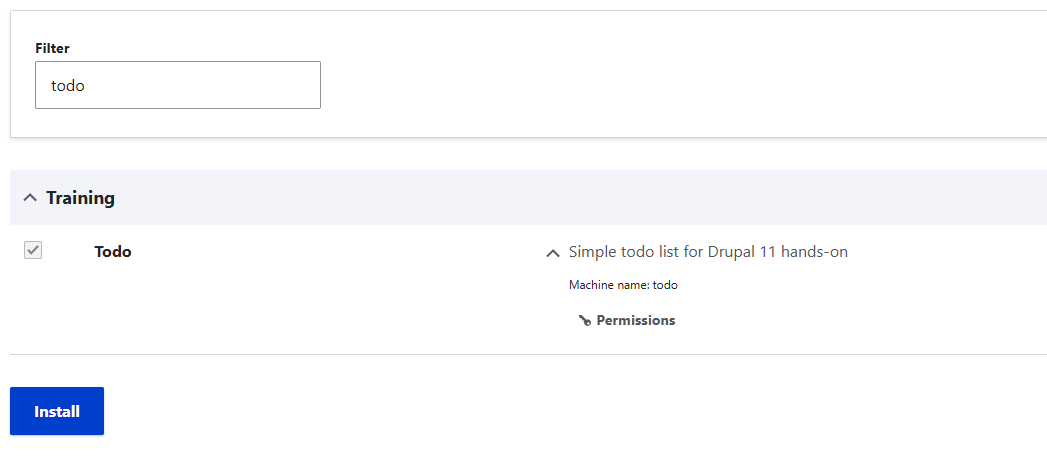
todo.info.yml
name: Todo -> モジュール名 (id)
type: module -> モジュール。このほかに library, project など
description: Simple todo list for Drupal 11 hands-on  -> モジュールの説明文。「Extend」から表示されるモジュールの一覧表示などに表示される
package: Training -> モジュールをカテゴリ分けするもの。「Extend」から表示されるモジュールの一覧表示などに利用される
core_version_requirement: ^11 -> drupal core バージョンの依存
todo.permissions.yml
add todo items:
  title: 'Add todo items'
  description: 'Create new todo items'
administer todo:
  title: 'Administer todo'
  description: 'Manage todo items'
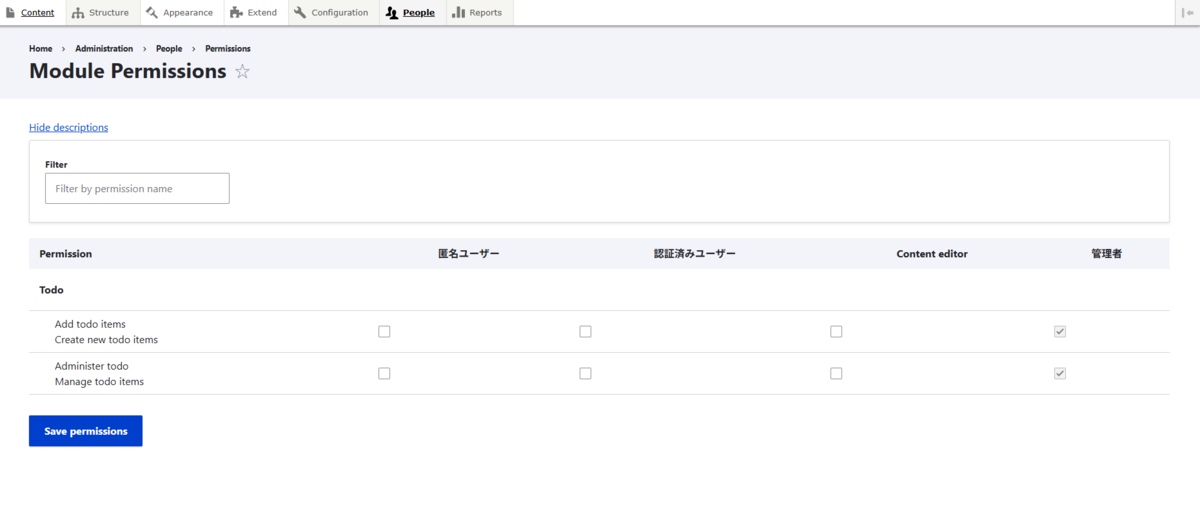
権限を定義するもの。画面上での表示は上の通り。
todo.routing.yml
todo.list:
  path: '/todo'
  defaults:
    _controller: '\Drupal\todo\Controller\TodoController::list'
    _title: 'Todo list'
  requirements:
    _permission: 'access content'

todo.add:
  path: '/todo/add'
  defaults:
    _form: '\Drupal\todo\Form\TodoAddForm'
    _title: 'Add todo item'
  requirements:
    _permission: 'add todo items'

todo.delete:
  path: '/todo/{id}/delete'
  defaults:
    _form: '\Drupal\todo\Form\TodoDeleteForm'
    _title: 'Delete todo item'
  requirements:
    _permission: 'administer todo'
  options:
    parameters:
      id:
        type: 'integer'
ルート情報を定義するもの。主に GET だが、 path にアクセスしたときに表示するページ、フォームを指定する。
ページについては Drupal\Core\Controller\ControllerBase を継承した Controller のメソッドを指定する。

フォームについては Drupal\Core\Form\FormBase を継承した Form のクラスを定義する形で指定する。
todo.services.yml
services:
  logger.channel.todo:
    parent: 'logger.channel_base'
    arguments: ['todo']

  todo.storage:
    class: 'Drupal\todo\Service\TodoStorage'
    arguments: ['@database', '@cache_tags.invalidator', '@logger.channel.todo', '@datetime.time']
サービスの定義を行う層。ここでいうサービスは、サービスコンテナで DI されるサービスを指す。
サービスコンテナは下記のように Controller に引数として受け渡され、 Controller にサービスを Injection する。
  public function __construct(
    private readonly TodoStorage $storage,
    private readonly DateFormatterInterface $dateFormatter
  ) {}
core.services.yml で定義されたサービスと、上記のように各モジュール以下 *.services.yml で定義されたサービスは、自動的にサービスコンテナに注入される。
今回は、以下のサービスを定義している。
- logger.channel.todo -> その名の通り Logger。
LoggerInterface のようなもの
- todo.storage -> Todo のエンティティを保存する Storage。
TodoRepositoryInterface のようなもの
todo.install
<?php

/**
 * Implements hook_schema().
 */
function todo_schema() {
  $schema['todo_item'] = [
    'description' => 'Stores todo items.',
    'fields' => [
      'id' => ['type' => 'serial','unsigned' => TRUE,'not null' => TRUE],
      'label' => ['type' => 'varchar','length' => 255,'not null' => TRUE],
      'done' => ['type' => 'int','size' => 'tiny','not null' => TRUE,'default' => 0],
      'created' => ['type' => 'int','unsigned' => TRUE,'not null' => TRUE],
    ],
    'primary key' => ['id'],
    'indexes' => ['done' => ['done']],
  ];
  return $schema;
}
*.install ファイル。マイグレーションのようなもの。
hook_schema() で定義されたテーブルは、アンインストール時に自動で削除されるとのこと。
追加で後片付けを行う場合は、 hook_uninstall() で実装。
TodoStorage.php
<?php

namespace Drupal\todo\Service;

use Drupal\Core\Database\Connection;
use Drupal\Core\Cache\CacheTagsInvalidatorInterface;
use Drupal\Core\Logger\LoggerChannelInterface;
use Drupal\Component\Datetime\TimeInterface;
use Drupal\Core\Database\Statement\FetchAs;

final class TodoStorage {
  public const CACHE_TAG = 'todo_list';

  public function __construct(
    private readonly Connection $db,
    private readonly CacheTagsInvalidatorInterface $invalidator,
    private readonly LoggerChannelInterface $logger,
    private readonly TimeInterface $time
  ) {}

  public function add(string $label): int {
    $this->db->insert('todo_item')->fields([
      'label' => $label,
      'done' => 0,
      'created' => $this->time->getRequestTime(),
    ])->execute();
    $this->invalidator->invalidateTags([self::CACHE_TAG]);
    $this->logger->notice('Added todo: @label', ['@label' => $label]);
    return (int) $this->db->lastInsertId();
  }

  public function all(): array {
    $q = $this->db->select('todo_item', 't')
      ->fields('t', ['id','label','done','created'])
      ->orderBy('id', 'DESC');
    return $q->execute()->fetchAllAssoc('id', FetchAs::Associative);
  }

  public function delete(int $id): void {
    $this->db->delete('todo_item')->condition('id', $id)->execute();
    $this->invalidator->invalidateTags([self::CACHE_TAG]);
    $this->logger->warning('Deleted todo @id', ['@id' => $id]);
  }

  public function countOpen(): int {
    $count = $this->db->select('todo_item', 't')->condition('done', 0)->countQuery()->execute()->fetchField();
    return (int) $count;
  }
}
todo.services.yml で定義された todo.storage のサービスクラス。
Todo のエンティティを保存する Storage。 TodoRepositoryInterface のようなもの。
試験のブループリントに「Object-Oriented な PHP を用いた~」というのがあったので、それを意識してくれた様子。
ここでは Interface は使われていないが、もし Todo のデータをメモリ上に格納したければ同様のメソッドを生やして InMemoryStorage など作り、 services.yml で差し替えればいいし、 API で接続された先にある保存先に格納したければ、同様のメソッドを生やして HogeApiService など作り、差し替えればよい。
TodoController.php
<?php

namespace Drupal\todo\Controller;

use Drupal\Core\Cache\CacheableMetadata;
use Drupal\Core\Controller\ControllerBase;
use Drupal\Core\Datetime\DateFormatterInterface;
use Drupal\Core\Link;
use Drupal\Core\Url;
use Drupal\todo\Service\TodoStorage;
use Symfony\Component\DependencyInjection\ContainerInterface;

final class TodoController extends ControllerBase {

  public function __construct(
    private readonly TodoStorage $storage,
    private readonly DateFormatterInterface $dateFormatter
  ) {}

  public static function create(ContainerInterface $container): static {
    return new static(
      $container->get('todo.storage'),
      $container->get('date.formatter')
    );
  }

  public function list(): array {
    $rows = [];

    foreach ($this->storage->all() as $item) {
      // Delete リンク(文字列化 + class 付与)
      $delete_url = Url::fromRoute('todo.delete', ['id' => (int) $item['id']]);
      $delete_url = $delete_url->setOptions([
        'attributes' => ['class' => ['button', 'button--small']],
      ]);
      $delete_link = Link::fromTextAndUrl($this->t('Delete'), $delete_url)->toString();

      $rows[] = [
        'data' => [
          $item['id'],
          $item['label'],
          $item['done'] ? $this->t('Done') : $this->t('Open'),
          $this->dateFormatter->format((int) $item['created']),
          // 文字列(MarkupInterface)として渡す
          $delete_link,
        ],
      ];
    }

    // Add リンク(同様に toString)
    $add_url = Url::fromRoute('todo.add')->setOptions([
      'attributes' => ['class' => ['button', 'button--primary']],
    ]);
    $add_link = Link::fromTextAndUrl($this->t('Add item'), $add_url)->toString();

    $build = [
      '#type' => 'table',
      '#header' => [
        $this->t('ID'),
        $this->t('Label'),
        $this->t('Status'),
        $this->t('Created'),
        $this->t('Operations'),
      ],
      '#rows' => $rows,
      '#empty' => $this->t('No items yet.'),
      // 下にボタンを表示(単純に #markup に流す)
      'actions' => [
        '#type' => 'container',
        'add_link' => ['#markup' => $add_link],
      ],
      '#cache' => [
        'tags' => [TodoStorage::CACHE_TAG],
        'contexts' => ['user.permissions'],
      ],
    ];

    (new CacheableMetadata())
      ->setCacheTags([TodoStorage::CACHE_TAG])
      ->setCacheContexts(['user.permissions'])
      ->applyTo($build);

    return $build;
  }
}
/todo にアクセスされたときに呼び出されるルート、 todo.list 。
その際に呼び出されるメソッドである TodoController::list() を定義する。
ポイントとしては、
create() メソッドの通り、サービスが DI コンテナから注入されている。'tags' => [TodoStorage::CACHE_TAG] の通り、作成するキャッシュにタグ付けを行っている'contexts' => ['user.permissions'] の通り、ユーザの権限によって作成されるキャッシュを変更している
点がある。
<?php

namespace Drupal\todo\Form;

use Drupal\Core\Form\FormBase;
use Drupal\Core\Form\FormStateInterface;
use Drupal\todo\Service\TodoStorage;
use Symfony\Component\DependencyInjection\ContainerInterface;

final class TodoAddForm extends FormBase {
  public function __construct(private readonly TodoStorage $storage) {}
  public static function create(ContainerInterface $c): static { return new static($c->get('todo.storage')); }
  public function getFormId(): string { return 'todo_add_form'; }

  public function buildForm(array $form, FormStateInterface $form_state): array {
    $form['label'] = ['#type' => 'textfield', '#title' => $this->t('What to do'), '#required' => TRUE, '#maxlength' => 255];
    $form['actions']['submit'] = ['#type' => 'submit', '#value' => $this->t('Add'), '#button_type' => 'primary'];
    return $form;
  }

  public function submitForm(array &$form, FormStateInterface $form_state): void {
    $label = (string) $form_state->getValue('label');
    $this->storage->add($label);
    $this->messenger()->addStatus($this->t('Added "@label".', ['@label' => $label]));
    $form_state->setRedirect('todo.list');
  }
}
/todo/add にアクセスされたときに呼び出されるルート情報 todo.add 。
これに紐づき、呼び出される TodoAddForm を定義する。
buildForm() がフォーム表示の際の処理。
submitForm() がフォームの入力内容を POST で送信し、サーバが受け付けた際の処理。
この二つのメソッドが必須っぽい感じがする。
なお、このような Form API 経由で呼び出したフォームは、 CSRF トークンや XSS 対策が標準で効くとのこと。
<?php

namespace Drupal\todo\Form;

use Drupal\Core\Form\ConfirmFormBase;
use Drupal\Core\Form\FormStateInterface;
use Symfony\Component\DependencyInjection\ContainerInterface;
use Drupal\todo\Service\TodoStorage;
use Drupal\Core\Url;

final class TodoDeleteForm extends ConfirmFormBase {
  private int $id;
  public function __construct(private readonly TodoStorage $storage) {}  public static function create(ContainerInterface $c): static { return new static($c->get('todo.storage')); }
  public function getFormId(): string { return 'todo_delete_form'; }
  public function getQuestion(): string { return $this->t('Are you sure you want to delete item @id?', ['@id' => $this->id]); }
  public function getCancelUrl(): Url { return Url::fromRoute('todo.list'); }
  public function getConfirmText(): string { return $this->t('Delete'); }
  public function buildForm(array $form, FormStateInterface $form_state, int $id = NULL): array { $this->id = (int) $id; return parent::buildForm($form, $form_state); }
  public function submitForm(array &$form, FormStateInterface $form_state): void {
    $this->storage->delete($this->id);
    $this->messenger()->addStatus($this->t('Deleted item @id.', ['@id' => $this->id]));
    $form_state->setRedirect('todo.list');
  }
}
getQuestion(), getConfirmText() , getCancelUrl() などを定義することによって、削除実行前に削除確認のページを挟むことができる (ConfirmFormBase)。
getQuestion() … 確認ページの見出し文getConfirmText() … 送信ボタンのラベルgetCancelUrl() … キャンセル遷移先
https://www.drupal.org/docs/drupal-apis/form-api/confirmformbase-to-confirm-an-action?utm_source=chatgpt.com

TodoBlock.php
<?php

namespace Drupal\todo\Plugin\Block;

use Drupal\Core\Block\BlockBase;
use Drupal\todo\Service\TodoStorage;
use Symfony\Component\DependencyInjection\ContainerInterface;
use Drupal\Core\Plugin\ContainerFactoryPluginInterface;

/**
 * @Block(
 *   id = "todo_count_block",
 *   admin_label = @Translation("Todo: open count")
 * )
 */
final class TodoBlock extends BlockBase implements ContainerFactoryPluginInterface {
  public function __construct(array $configuration, $plugin_id, $plugin_definition, private readonly TodoStorage $storage) {
    parent::__construct($configuration, $plugin_id, $plugin_definition);
  }
  public static function create(ContainerInterface $c, array $conf, $id, $def): static {
    return new static($conf, $id, $def, $c->get('todo.storage'));
  }
  public function build(): array {
    $count = $this->storage->countOpen();
    return ['#markup' => $this->t('@count open items', ['@count' => $count]), '#cache' => ['tags' => [TodoStorage::CACHE_TAG]]];
  }
}
Drupal\Core\Block\BlockBase を拡張したクラスを定義し、 Plugin/Block 以下に設置することで、モジュールからカスタムブロックを作成することができる。
モジュールの有効化後、任意のリージョンに設置することができる。

モジュール削除すると、作成したカスタムブロックは削除されるので、リージョンに設置したブロックも削除されるらしい。
その他
コード品質
コーディング規約のチェックを、 phpcs により行うことが可能。
tarohida@drupal11-web:/var/www/html$ ./vendor/bin/phpcs -p --standard=Drupal,DrupalPractice web/modules/custom/todo
Xdebug: [Step Debug] Could not connect to debugging client. Tried: 10.255.255.254:9003 (fallback through xdebug.client_host/xdebug.client_port).
EEEEEE 6 / 6 (100%)


FILE: /var/www/html/web/modules/custom/todo/tests/Kernel/TodoStorageKernelTest.php
--------------------------------------------------------------------------------------
FOUND 9 ERRORS AND 1 WARNING AFFECTING 7 LINES
--------------------------------------------------------------------------------------
  7 | ERROR   | [ ] Missing short description in doc comment
  8 | WARNING | [x] 'todo' should match the format '@todo Fix problem X here.'
 11 | ERROR   | [ ] Missing member variable doc comment
 11 | ERROR   | [x] Expected one space after the comma, 0 found
 11 | ERROR   | [x] Expected one space after the comma, 0 found
また、コード品質のチェックを、 phpstan によって行うことも可能。
tarohida@drupal11-web:/var/www/html$ php -d xdebug.mode=off ./vendor/bin/phpstan analyse
Note: Using configuration file /var/www/html/phpstan.neon.dist.
 7/7 [▓▓▓▓▓▓▓▓▓▓▓▓▓▓▓▓▓▓▓▓▓▓▓▓▓▓▓▓] 100%

 ------ ---------------------------------------------------------------------------------------------------------------
  Line   src/Controller/TodoController.php
 ------ ---------------------------------------------------------------------------------------------------------------
  16     Method Drupal\todo\Controller\TodoController::list() return type has no value type specified in iterable type
         array.
         🪪  missingType.iterableValue
         💡  See: https://phpstan.org/blog/solving-phpstan-no-value-type-specified-in-iterable-type
  24     Call to an undefined method Drupal\todo\Controller\TodoController::dateFormatter().
         🪪  method.notFound
 ------ ---------------------------------------------------------------------------------------------------------------
使用できるモジュール:Webprofiler

パフォーマンス改善案例:
Cache Tag -> キャッシュのタグ付けを行うもの。データの更新があった際に、一括でキャッシュを削除できる。
https://www.drupal.org/docs/drupal-apis/cache-api/cache-tags
例:'#cache' => ['tags' => ['todo_list']] を付け、更新時に invalidateTags(['todo_list'])。
todo.list の処理側で下記をつけておき、
// Render配列側
$build['#cache'] = [
  'tags' => ['todo_list'],
  'contexts' => ['user.permissions'],
];
todo.add, todo.delete の処理側で下記をつけておけば、
$this->invalidator->invalidateTags(['todo_list']);
タスクの追加、削除があった際、自動的に "todo_list" のタグ付けがされたキャッシュが削除され、最新のコンテンツが表示されるようになる。
基本の文法は thing:identifier。 node:5 のように指定する。
他、以下のような記法がある。
Cache Contexts -> ユーザや言語など、条件 (Context) ごとに別でキャッシュを持たせることができる。
例:権限差で出し分け→ '#cache' => ['contexts' => ['user.permissions']]。
https://www.drupal.org/docs/drupal-apis/cache-api/cache-contexts
他にも、色々な条件が設定できるらしい
使用できる拡張: Xdebug などの PHP プロファイラ
-> 具体的に、プロファイラとして Xdebug を利用する方法知らないや。どうすればいいか誰か教えて
セキュリティ対策
権限: todo.routing.yml で _permission を指定
これによって、適切な権限を持つユーザにのみ、該当の操作を指せるようにすることができる。
DB: Drupal DB API を利用することで、 SQL を手書きせず、自動的な SQL エスケープ、プレースホルダを利用
ログ: logger.channel.todo で監査可能
-> サービスコンテナとして定義したロガーによるもの。
  logger.channel.todo:
    parent: 'logger.channel_base'
    arguments: ['todo']
下記の通り、 type が "todo" となる。これは channel の値が "todo" であることによる。

phpunit によって行うことができます。
tarohida@drupal11-web:/var/www/html$ SIMPLETEST_DB='mysql://db:db@db:3306/db?charset=utf8mb4' \
BROWSERTEST_OUTPUT_DIRECTORY=/var/www/html/web/sites/simpletest/browser_output \
php -d xdebug.mode=off ./vendor/bin/phpunit \
  -c web/core/phpunit.xml.dist \
  --testsuite kernel \
  web/modules/custom/todo/tests
PHPUnit 11.5.39 by Sebastian Bergmann and contributors.

Runtime:       PHP 8.3.16
Configuration: /var/www/html/web/core/phpunit.xml.dist

D                                                                   1 / 1 (100%)

Time: 00:03.720, Memory: 6.00 MB

1 test triggered 1 deprecation:

1) /var/www/html/web/core/lib/Drupal/Core/Database/Statement/StatementBase.php:328
Passing the $fetch argument as an integer to fetchAllAssoc() is deprecated in drupal:11.2.0 and is removed from drupal:12.0.0. Use a case of \Drupal\Core\Database\Statement\FetchAs enum instead. See https://www.drupal.org/node/3488338

Triggered by:

* Drupal\Tests\todo\Kernel\TodoStorageKernelTest::testAddAndCount
  /var/www/html/web/modules/custom/todo/tests/Kernel/TodoStorageKernelTest.php:18

OK, but there were issues!
Tests: 1, Assertions: 2, Deprecations: 1, PHPUnit Deprecations: 2.
学習リソースその2
テーマ周りについても学習リソースを作成してもらったので、これを進める。
### development.services.yml
parameters:
  twig.config:
    debug: true
    auto_reload: true
    cache: false
これによって、 Twig のデバッグを有効化する。
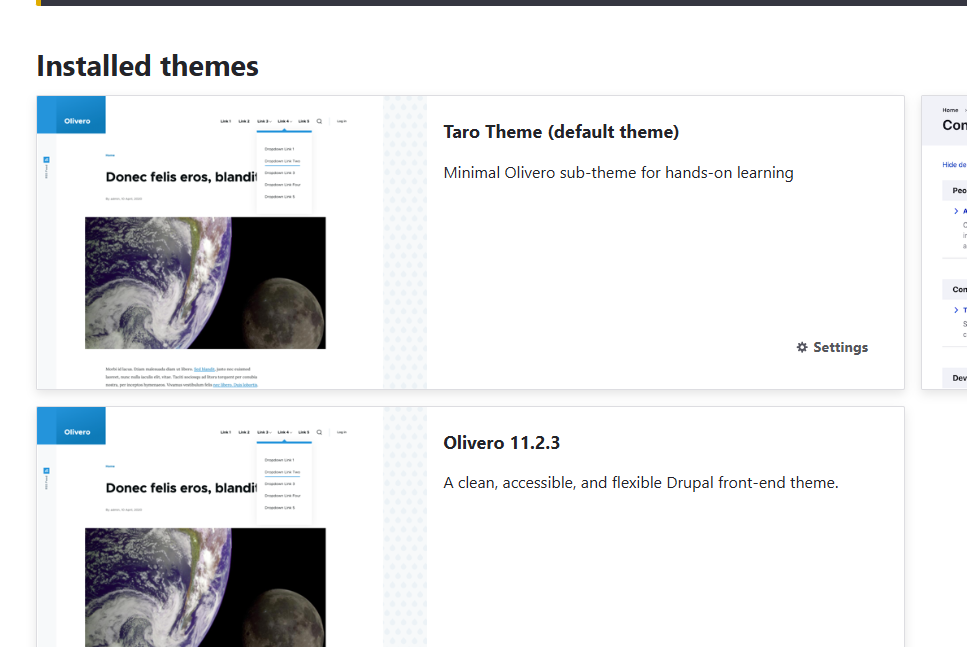
taro_theme.info.yml
{theme_id}.info.yml は、テーマの情報を記述したファイル。必須。
name: 'Taro Theme'
type: theme
description: 'Minimal Olivero sub-theme for hands-on learning'
package: Custom
base theme: olivero
core_version_requirement: ^11

libraries:
  - taro_theme/global

-> 紐づくライブラリの定義 -> 何に使うんやろ

regions:
  header: Header
  hero: Hero
  content: Content
  sidebar: Sidebar
  footer: Footer

-> 各種リージョンの定義
taro_theme.libraries.yml
テーマが読み込む CSS, JS などのアセットファイルのパスを指定
global:
  css:
    theme:
      assets/css/global.css: {}
  js:
    assets/js/global.js: {}
  dependencies:
    - core/drupal
    - core/drupalSettings
/assets/css/global.css
読み込まれる css アセットファイル。
:root { --brand: #3b82f6; }
.taro-hero { padding: 2rem; background: var(--brand); color: #fff; border-radius: .5rem; }
.taro-badge { display:inline-block; padding:.2rem .5rem; border:1px solid currentColor; border-radius:.25rem; font-size:.8rem; }
/assets/js/global.js
読み込まれる js アセットファイル。
((Drupal, drupalSettings) => {
  Drupal.behaviors.taroHello = {
    attach(context) {
      if (!context.querySelector('[data-taro-hello]')) return;
      // Just a demo hook point
      // console.log('taro_theme attached', drupalSettings.path);
    }
  };
})(Drupal, drupalSettings);
/templates/page.html.twig
全ページ共通のテンプレートファイルを変更。基底クラス的な。
{# 最小のページテンプレート。Twigの if/for, 変数出力などを体験 #}
{% set classes = [
  'layout-container',
  logged_in ? 'is-logged-in' : 'is-anon'
] %}

<div{{ attributes.addClass(classes) }} data-taro-hello>
  <header class="site-header">
    <div class="branding">
      <a href="{{ path('<front>') }}" class="site-name">{{ site_name|escape }}</a>
    </div>
    {% if page.header %}
      <div class="region-header">{{ page.header }}</div>
    {% endif %}
  </header>

  {% if page.hero %}
    <section class="taro-hero">
      <h2>{{ hero_title|default('Welcome') }}</h2>
      {{ page.hero }}
    </section>
  {% endif %}

  <main role="main" class="site-main">
    <a id="main-content" tabindex="-1"></a>
    {{ page.content }}
    {% if page.sidebar %}
      <aside class="sidebar">{{ page.sidebar }}</aside>
    {% endif %}
  </main>

  <footer class="site-footer">
    {{ page.footer }}
  </footer>
</div>
/templates/node--article.html.twig
Node エンティティのサブタイプ、 Article コンテンツタイプのテンプレートファイルを作成。
<article{{ attributes.addClass('node--article') }}>
  <header>
    <h1>{{ label }}</h1>
    <div class="meta">
      <span class="taro-badge">
        {{ published ? 'Published' : 'Draft' }}
      </span>
      {% if reading_time %}
        <span class="taro-badge">~{{ reading_time }} min read</span>
      {% endif %}
      <time datetime="{{ node.created.value|date('c') }}">
        {{ node.created.value|date('Y-m-d') }}
      </time>
    </div>
  </header>

  <div class="content">
    {{ content|without('links') }}
  </div>

  {% if content.links %}
    <nav class="node-links">{{ content.links }}</nav>
  {% endif %}
</article>
without('links') などで、特定のフィールドを除外
メニューブロックのテンプレートを変更
いずれも、 ./themes/custom/theme_name/templates/ 以下にある。
そして、 {node|block}--sub1-sub2-sub3.html.twig
エンティティからデータを受け取ってテンプレートにぶち込む前に、テンプレートに値を当てはめたりする。
<?php

/**
 * @file
 * Theme hooks and preprocess functions for Taro Theme.
 */

/**
 * Implements hook_preprocess_html().
 */
function taro_theme_preprocess_html(array &$variables) {
  // 週末なら body にクラスを追加
  $is_weekend = in_array((int) date('w'), [0,6], true);
  if ($is_weekend) {
    $variables['attributes']['class'][] = 'is-weekend';
  }
}

/**
 * Implements hook_preprocess_page().
 */
function taro_theme_preprocess_page(array &$variables) {
  // ヒーローの見出し(サイト名を拝借)
  $config = \Drupal::config('system.site');
  $variables['hero_title'] = $config->get('name') ?: 'Welcome';
  // 必要ならここでライブラリ追加も可能
  // $variables['#attached']['library'][] = 'taro_theme/global';
}

/**
 * Implements hook_preprocess_node().
 */
function taro_theme_preprocess_node(array &$variables) {
  /** @var \Drupal\node\NodeInterface $node */
  $node = $variables['node'] ?? null;
  if (!$node) {
    return;
  }
  // 公開/非公開を簡便に
  $variables['published'] = (bool) $node->isPublished();

  // 記事の推定読了時間(ざっくり)
  if ($node->bundle() === 'article' && $node->hasField('body')) {
    $text = $node->get('body')->summary ?: $node->get('body')->value;
    $words = str_word_count(strip_tags((string) $text));
    $variables['reading_time'] = max(1, (int) ceil($words / 400)); // 400wpm を仮定
  }
}
結果
結果は 58%で NG でした 😿